
Format Settings Tab
What is it?
The Format Settings tab is where you define how key formats are displayed and interpreted, such as dates, currency, numeric separators, and more.
This ensures that Dost correctly understands the extracted data and that you see it consistently across the platform.
What is it used for? (Business Impact)
- Prevents interpretation errors (for example, confusing day/month/year formats).
- Ensures all users see information in a consistent format.
- Facilitates integration with your ERP, which may require specific formatting rules.
When Do I Use It?
- During onboarding, to adapt Dost to how your company handles dates and currency.
- After onboarding, when a supplier uses formats that differ from Dost defaults (EUR currency and DD/MM/YYYY date format).
- When changing country, currency, or accounting standards (for example, during international expansion).
How Do I Do It? (Steps + Visual Guide)
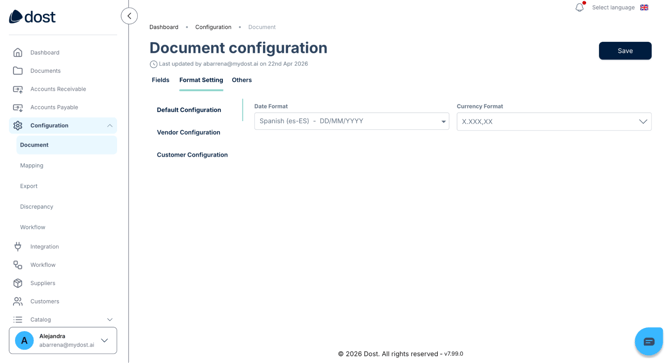
1. Access the “Format Settings” Tab
Go to the document configuration section and open Format Settings.
2. Configure the Date Format
Select the format used by your company, such as:
- DD/MM/YYYY
- YYYY-MM-DD
3. Configure Currency and Symbols
- Select the main currency (for example, EUR).
- Define whether currency symbols (such as “€”) are displayed.
- Adjust how thousand separators and decimal separators are handled.
4. Review Additional Settings
Depending on your account configuration, you may also find options such as:
- Rounding rules
- Number of decimal places
In the image below, you can see the Format Settings screen showing date and currency selectors.
Best Practices
- Ensure the date format in Dost matches both your ERP requirements and user expectations.
- If you work with multiple currencies, define internally which one is the primary currency and how secondary currencies should be handled.