
“Other” Tab (Advanced Options)
What is it?
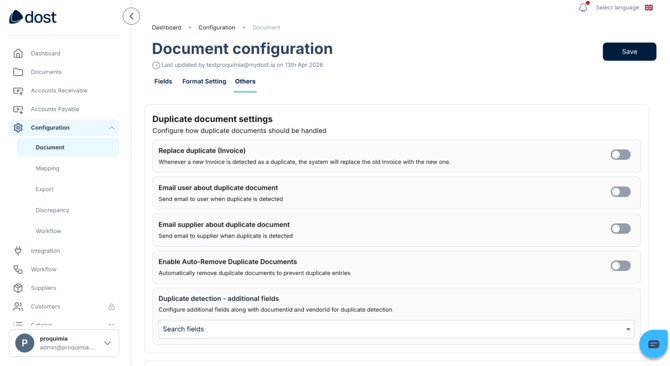
The Other tab allows you to define which actions should be executed for duplicate documents and which fields should be used to identify duplicates (for example: invoice number + supplier VAT ID + invoice date).
What is it used for? (Business Impact)
- Helps ensure duplicate documents are not sent for accounting or payment.
- Includes settings that improve usability or adapt the system to your operational needs.
When Do I Use It?
- Typically after configuring Fields, Format Settings, and Discrepancies.
- When the Dost team recommends enabling a specific option for your use case.
How Do I Do It? (Steps + Visual Guide)
1. Access the “Other” Tab
Go to the document configuration section and open the Other tab.
2. Review Available Options
Go through each available setting carefully.
3. Enable Only What You Need
Activate only the options relevant to your workflow.
If an option is not clear, it is recommended to ask for clarification before enabling it. Contact us if you need help.
In the image below, you can see the Document Configuration screen, with the Other tab showing the different duplicate-related settings.
Best Practices
- Document any changes you make in this tab internally (what was enabled, when, and why).
- Avoid frequently changing these settings; they should remain relatively stable over time.