Monitoring Training Status
It is useful to know whether the training you initiated is in progress, completed, or if any issues have occurred.
How Do I Do It? (Steps + Visual Guide)
1. Access the Self-Training Section
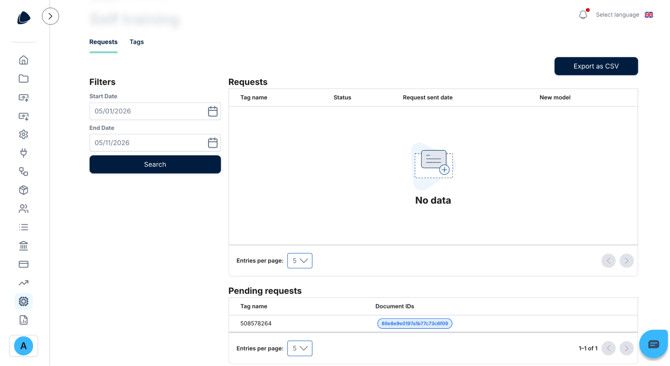
From your user account, click on the Self-Training Report section.
2. View the List of Active or Completed Trainings
- Select a date range.
- You will see the tags used for self-training (for example, supplier VAT IDs).
- For each tag, you should be able to view information such as:
- Status: in progress or completed
- Date the training was submitted
3. Verify That the Training Has Been Applied
Once the training is completed, open new invoices from that supplier.
Check whether the trained fields (VAT ID, totals, etc.) are now correctly extracted without requiring manual corrections.
In the image below, you can see the Self-Training section and where you can find the list of trainings in your account.