
The main menu is the map of Dost.
Understanding it and locating it from the start is key to knowing where to find documents, settings, and relevant tools without getting lost.
Steps
Identify the left-hand menu
Once you are logged in, you will see a vertical menu on the left side of the screen with the main sections (for example: Documents, Workflows, Settings, etc.).
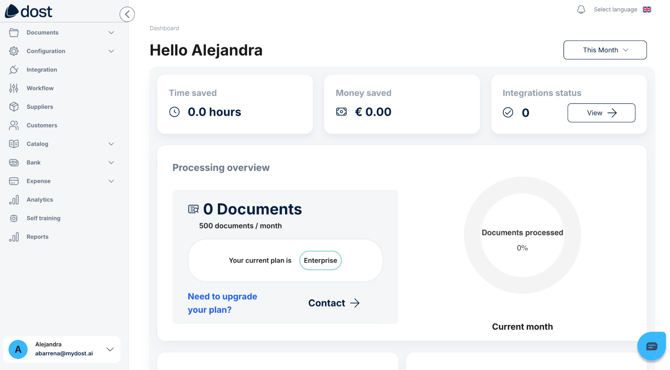
In the image above, you can see the full screen with the complete left-hand menu, with each section labeled.
Recognize the basic sections to get started
Documents: where you can view and manage invoices, purchase orders, and delivery notes.
Mappings: where rules are created and managed to tell Dost how to extract data from documents.
User Management: where users, roles, and some initial settings are edited.
Workflows (admin only): for approval rules.
For basic onboarding, focus on:
- Where you can see the documents.
- Where you would create a user.
- Where you would configure an approval flow.
Take a first guided tour
Click on each main section to get familiar with the interface without changing anything yet.
Keep in mind where you can see the documents, where you would create a user, and where you would configure an approval flow.