
Uploading your first documents
By uploading your documents, Dost can help you automate processes that were previously manual.
This step marks the beginning of the platform’s practical use.
Steps
Go to the “Documents” section
In the left-hand menu, click on “Documents”.
In the image below, you can see the Documents section with the sample list and the upload documents button.
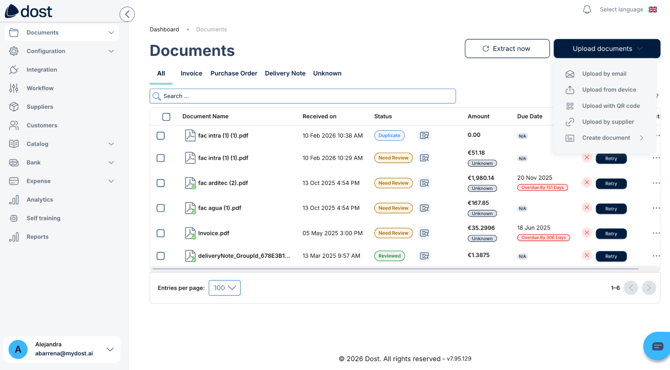
Click on “Upload documents”
Upload a small test batch
We recommend uploading 3–5 sample documents, such as invoices or delivery notes, to see the full workflow.
Check that they appear in the list with their initial status, for example “Reviewed” or “Needs review”.
Verify that the data is extracted correctly
Open one of the uploaded documents.
Review key fields such as supplier, date, amount, taxes, etc.
This initial review will help you detect whether you need to adjust any settings, such as required fields, formatting, or mappings.
Best practices
Start with a small group.
Work first with a reduced user group, for example only the accounts payable team, before opening access to the entire company.
Upload real but controlled documents.
Use invoices and documents that are representative, but not critical while the initial setup is being adjusted.
Document the initial decisions.
- Which roles exist and who has them.
- Which document upload channels will be used, manual, email, ERP.
- What is considered “correct” in a first review.
Write down the following:
Coordinate with Dost or with your internal team.
If Dost supports you during onboarding, take advantage of this phase to validate key settings, such as fields, discrepancies, and future workflows.